



Proxies for Telegram: How to Connect One and Why a Purchased Account May Need an IP from Its Own Country
Proxies for Telegram: How to Connect One and Why a Purchased Account May Need an IP from Its Own Country
A purchased Telegram account may open without any issues, only to suddenly ask you to log in again or stop sending messages. Sometimes this happens shortly after signing in, so the IP address is the first thing people suspect. However, various factors can affect Telegram's decisions, including user reports and violations of the service's rules. Signing in from another country alone does not prove what caused an account restriction.
If you use a purchased account, a proxy can help you route your connection through a selected region. Here's what to keep in mind before logging in and how to add a SOCKS5 proxy to Telegram on a computer or phone.
Why an Account May Be Restricted After Login
An account sold with access comes with a particular risk: the buyer does not always know its history. The seller may have shared the credentials with several people, the account may have been used for mass messaging, or active sessions may still be linked to it. Even if the login is successful, that does not mean the account is securely under its new owner's control.
A change of IP address may also attract attention, but it's impossible to say that this alone caused an account restriction. Telegram states that accounts can be frozen for serious violations of its rules or reports about unwanted messages. When an account is restricted, the app may still allow users to read chats while preventing them from sending messages or publishing content. If you believe the restriction was applied by mistake, use the appeal option available in the app rather than trying to "fix" it by changing proxies.
Why the IP Country Matters
If you regularly use Telegram from one region and then connect through an IP address from another country, your network route changes. This does not mean the account will automatically be blocked, but a sudden change in connection conditions can make troubleshooting more difficult if login problems arise.
When choosing a proxy, consider not only the country but also connection stability. Avoid switching between random IP addresses frequently unless necessary. Most importantly, a proxy changes your network route, but it does not change your phone number, account owner, or account history.
Which Proxy Should You Choose for Telegram?
For a постоян connection, you can choose either a static proxy or a residential proxy. Both options let you select a GEO location.
Static Proxy — One IP for the Entire Paid Period
A static proxy keeps the same IP address throughout the paid period. You choose the country when purchasing the proxy, and its GEO cannot be changed afterward.
Node Proxy offers two types of static proxies: datacenter and residential ISP. Both are suitable when you need a permanent IP address from a specific location.
Residential Proxy — Change GEO Within Your Traffic Allowance
With a residential proxy, you can choose a GEO location and change it as many times as you like until your purchased traffic is used up. This is useful if your work involves multiple countries and you don't want to buy a separate static IP for each one. On the Node Proxy website, you can select the locations you need and check the current terms before making a purchase.
A Quick Recommendation
If you need the same IP address from a specific country for an extended period, choose a static proxy. If you need to switch between countries without purchasing a separate IP for each one, go with a residential proxy.
How to Connect SOCKS5 in Telegram
To connect, you'll need your proxy details: the server address or IP, port, and, if required, a username and password. Use the settings provided by your proxy provider and don't share them with anyone else.
Telegram supports proxy connections in both its mobile and desktop apps. Menu names may vary slightly depending on the app version.
On a Computer
-
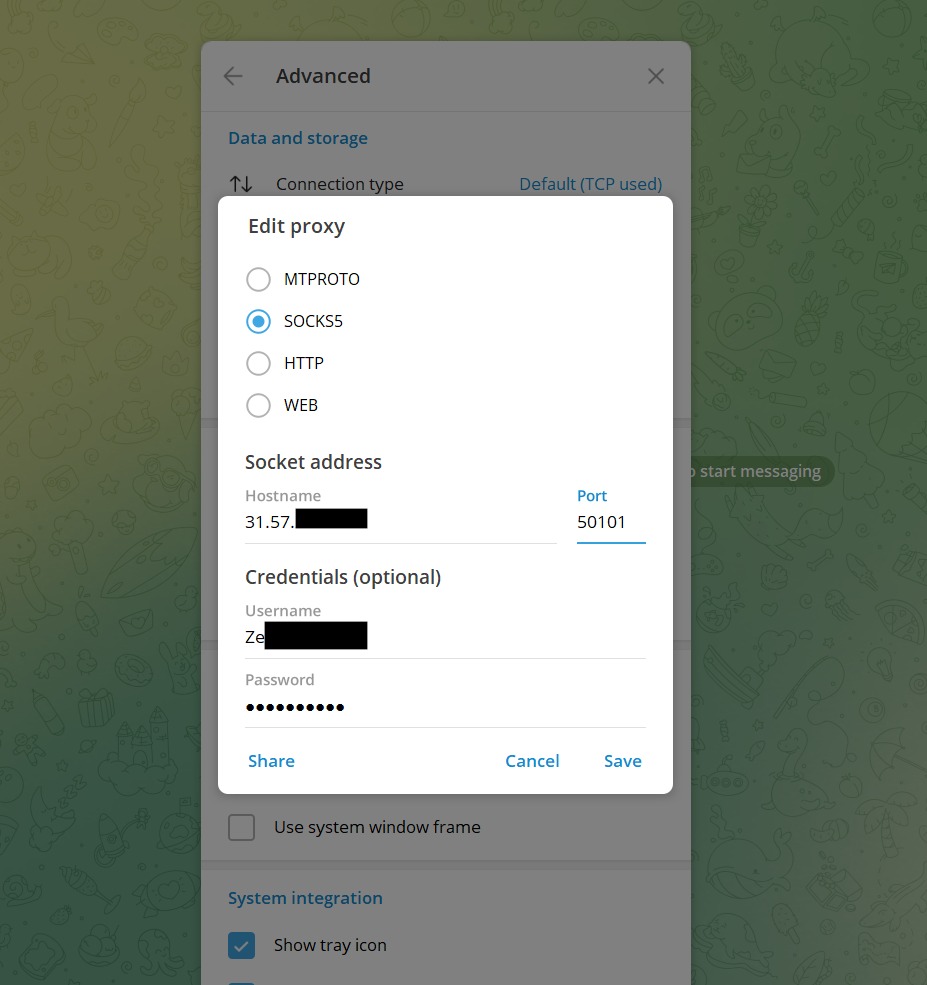
Open Telegram Desktop and go to Settings → Advanced → Connection Type.
-
Select the SOCKS5 connection option. In some versions, it may be called TCP with custom socks5-proxy.
-
Enter the server address and port.
-
If the proxy requires authentication, fill in the Username and Password fields.
-
Save your settings and check whether Telegram connects.
On Android
-
Open Settings → Data and Storage → Proxy Settings.
-
Tap to add a proxy and select SOCKS5.
-
Enter the server address, port, username, and password, if required.
-
Save your settings and enable the proxy.
On iPhone
-
Open Settings → Data and Storage → Proxy.
-
Add a proxy and select SOCKS5.
-
Enter the server address and port, then fill in the authentication details if necessary.
-
Save your settings and enable the connection.
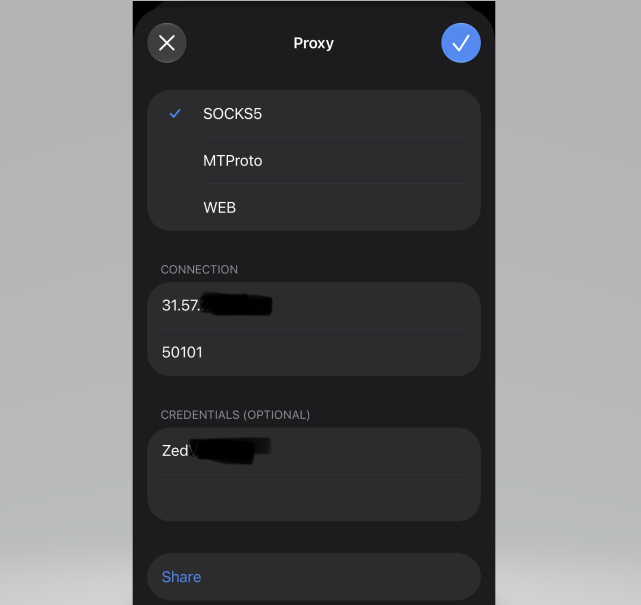
If the connection doesn't work, check the server address, port, and login details. Make sure you've selected SOCKS5 and that the proxy is active.
If You Have a Session File or a tdata Folder
Session files and the tdata folder may contain information that allows someone to access an account without the usual phone-number login. Treat them as confidential credentials: don't download them from questionable sources, send them to unfamiliar sellers, or run them on a device where you keep personal accounts.
If you received these files along with a purchased account, that does not prove the seller was authorized to transfer access or that they can no longer log in. The safer approach is not to use an unknown session, but to clarify with the rightful owner who owns the account and how access can be transferred properly. Do not attempt to bypass Telegram restrictions using someone else's session data.
Checklist Before Your First Login
Before connecting, make sure that:
-
You understand who controls the phone number and whether they can recover the account.
-
Your device is password-protected, and the app was installed from an official source.
-
Your proxy details come from a reliable provider and have not been shared publicly.
-
You've chosen the right type of proxy and checked the current connection terms.
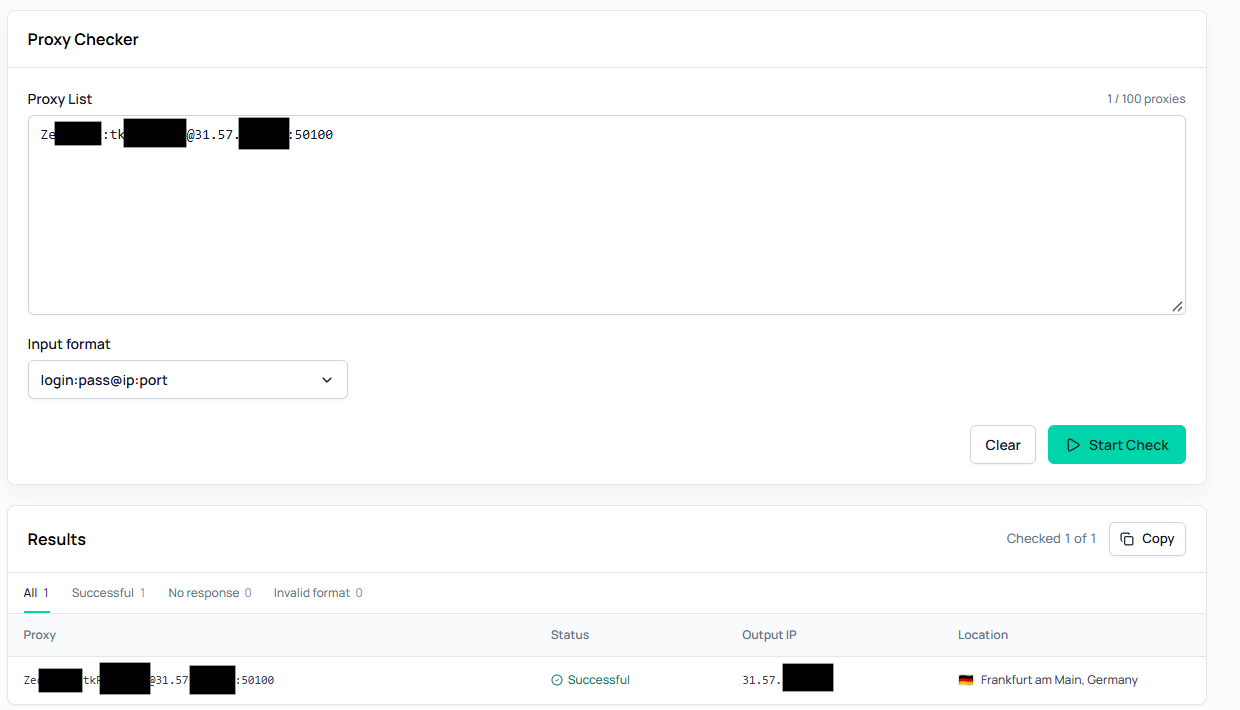
If you need to check an IP address's geolocation, use the Node Proxy checker. It can help you compare the detected country with your selected GEO, but results may vary between services because geolocation databases are not updated simultaneously.
Conclusion
Choose a proxy for Telegram based on what you need: a static proxy is the better option if you want a permanent IP from a selected country, while a residential proxy is more suitable if you need to change GEO locations within your purchased traffic allowance. Both options let you select a country, but with static proxies you do so when purchasing, whereas residential proxies let you change it whenever necessary. A proxy alone cannot guarantee that an account will remain unrestricted.
